LHDN returns currency error : DC511 Foreign target currency should always be MYR.
Introduction
This issue is pertaining to LHDN's mandatory requirement that currency for e-invoices need to be in MYR.
This usually occurs when your organization's default currency is anything other than MYR.
If your Organization's currency needs to be changed to MYR
In these cases, you may find your organization's base currency via:
Settings > setup and configurations > currencies

Note : Zoho intervention and assistance will be needed for guidance in changing default currency should you need to change this setting in an active Zoho account,
as by default Zoho Books does not allow for changing currency when existing transactions use the currency settings needing to be changed.
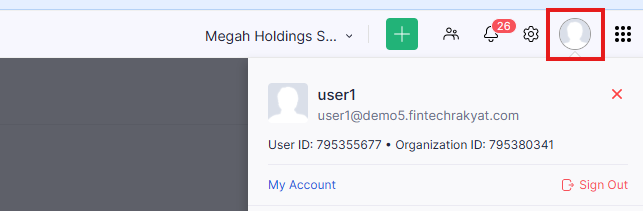
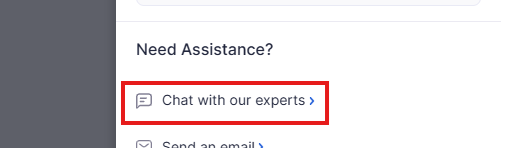
you may contact zoho via the live chat located by clicking the user profile picture in the top right and accessing "chat with our experts"
as by default Zoho Books does not allow for changing currency when existing transactions use the currency settings needing to be changed.
you may contact zoho via the live chat located by clicking the user profile picture in the top right and accessing "chat with our experts"
If only this specific Customer's currency needs to be MYR
Should only this specific customer need to be in MYR,
- Navigate to the customer's profile in Zoho Books
- Find this setting under "other details" > "currency"
- Select MYR from the dropdown list
- save the customer's profile.

- This is a default Zoho feature, and not related to the plugin, however the plugin was built around this when taking into account e-invoicing regulations for currency types.
- Once this setting is completed, all invoices for this customer will be converted automatically to MYR for e-invoice readiness.
- Existing invoices may need to be edited and resaved (without changing any information) for this change to take effect.
Should the above not resolve the issue,
please do not hesitate to contact us by submitting a support ticket via our portal : https://support.ooroboros.com/portal/en/newticket
and we will get back to you as soon as we can with guidance.